
Manage tickets with Jira hierarchy
When you use JIRA hierarchy to generate projects, NeoTax is designed to minimize manual work—your JIRA structure flows automatically into NeoTax projects.
Key Background: How NeoTax Handles JIRA Changes
When you use JIRA hierarchy to generate projects, NeoTax is designed to minimize manual work—your JIRA structure flows automatically into NeoTax projects.
However, NeoTax intentionally locks project names and parent structures once a ticket has effort in a closed period. This protects your historical records: if accounting has already closed a month using specific project assignments, moving those tickets later would create misalignment between your application data and closed financial reports.
What this means in practice:
- If you move a ticket or Epic in JIRA after it was initially synced, NeoTax will not automatically update the assignment
- You can manually move items in NeoTax, but timing matters
Why This Matters for Accounting
NeoTax locks historical data to protect accounting accuracy. If accounting has already closed a month using specific project assignments and capitalization values:
- Changing ticket locations would create misalignment with closed financial reports
- Capitalization amounts would no longer match what was reported
- Prior period adjustments would be needed
It ensures your ASC 350-40 compliance is maintained across periods.
When It’s Safe to Move Tickets
| Situation | Safe to Move? |
|---|---|
| Initial setup (no closed periods yet) | ✅ Always safe |
| Ticket/Epic is new in the most recent synced period | ✅ Safe—no prior month data exists |
| Ticket/Epic had effort in a closed period | ⚠️ Discuss with Accounting first—could cause misalignment with closed reports |
Key System Behaviors
Understanding these will help you predict what NeoTax will do:
- JIRA Initiatives and Epics automatically become NeoTax projects once they have effort (started tickets).
- Future tickets follow their parent’s current NeoTax location. When a new ticket syncs, it’s assigned based on where its parent Epic currently sits in NeoTax—not where it might have moved to in JIRA.
- NeoTax doesn’t auto-update moved items. If you restructure in JIRA after initial sync, you’ll need to manually align NeoTax if you want them to match.
Common Scenarios
Scenario 1: Move a Ticket or Epic to an Existing NeoTax Project
Use when:
- An Epic was under the wrong JIRA Initiative on initial sync
- A ticket was assigned to the wrong Epic
- Tickets weren’t in any Epic initially but should be in an existing one
Steps:
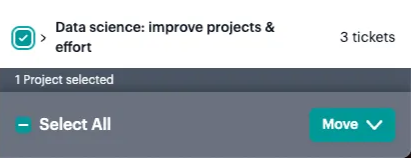
- Navigate to the Project containing the ticket(s) or Epic you want to move
- Go to Project > Tickets tab
- Select the ticket(s) or Epic
- Choose the destination NeoTax project (the one matching the correct Initiative/Epic)
- Click Move Tickets

Scenario 2: Move Tickets or Epics to a New Project (Not Yet in JIRA)
Use when:
- Multiple Epics should be grouped under an Initiative that doesn’t exist in JIRA yet
- Tickets need to be in an Epic that hasn’t been created in JIRA
Steps:
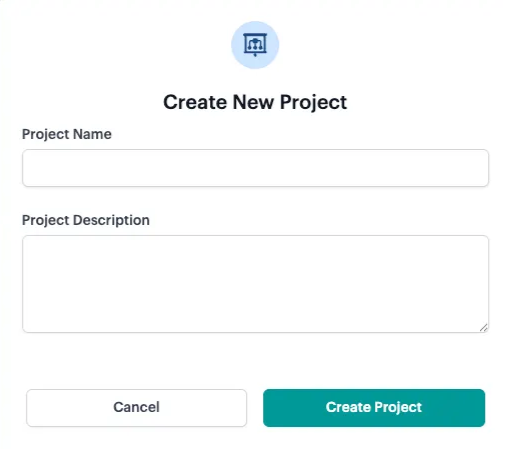
- Create a new project manually in NeoTax
- Move the ticket(s) or Epic to that project
⚠️ Important: Future sync behavior
When you manually create a project in NeoTax:
- Future tickets in a moved Epic will sync to this manually-created project
- If you later create the matching Initiative/Epic in JIRA and add tickets to it, NeoTax will create a separate, second project for those new items
- NeoTax will not automatically combine them with your manually-created project
To keep everything together: Each time new Epics or tickets appear in that second auto-created project, move them to your original manually-created project.
Summary: Aligning NeoTax with JIRA Changes
| If you did this in JIRA… | NeoTax will… | You should… |
|---|---|---|
| Moved a ticket to a different Epic | Keep it in original location | Manually move in NeoTax |
| Moved an Epic to a different Initiative | Keep it in original project | Manually move in NeoTax |
| Renamed an Epic or Initiative | Keep the original name | Edit the project name in NeoTax if needed |
| Forgot to create an Initiative for some Epics, the Epics were already started and synced to NeoTax | Treat the Epics as individual projects | Create a project and move the Epics into the manually created project if you want to consolidate the effort. |
| Later, you create an Initiative in JIRA with the same name and put new Epics/tickets in it | Create a new project with that name, containing only the new Epics/tickets | Move those new Epics/Tickets to your manually created project if you want to keep all the effort together. |