
ASC 350-40 walkthrough for auditors
Neo.Tax provides a comprehensive, auditable process for companies to calculate, review, and track software capitalization for ASC 350-40.
This is designed to make it easy for you the auditor to verify and reduce the need for back-and-forth and reliance on inaccurate memories and estimates.
The system identifies and tracks capitalized time by using contemporaneous data directly from company’s project management/ticketing system (JIRA, Linear, Azure Devops), replacing inaccurate after-the-fact estimates and interviews.
This ensures every dollar of capitalized software is traceable, defensible, and compliant with GAAP guidance.
You can provide this document to your auditor to help them understand how Neo.Tax works and how to smoothly audit it.
Neo.Tax’s Solution High Level
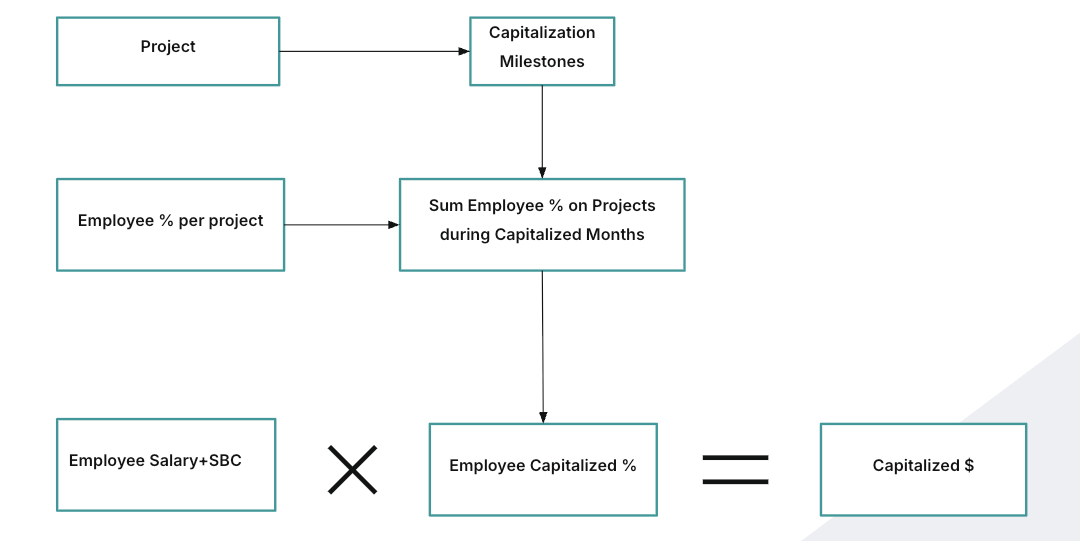
- Project based approach. Capitalization determined at the project level
- Milestone-based tracking aligned with accounting standards
- Capitalization $ is at the employee level and summed up to the project
- Calculates time allocation with 100% accountability to source data
- Complete audit trail from individual tickets to final capitalization
Neo.Tax Output
When it’s time for audit, Neo.Tax’s export provides you the auditor with everything needed to verify and validate the capitalized $ amounts.
The export provides a complete accounting of capitalized work from the top level down to the most granular. To recalculate and validate the Capitalized % per person, you will want to head to the Effort By Project by Person sheet and follow the instructions below to pivot it.
Projects Sheet
This shows the Capitalized $ amount per Project and the Capitalization Milestones set for the project.

This total reflects the sum of people’s time on the project in the capitalized period, which is from the capitalization start through the end month.
The projects are based on the company’s Neo.Tax configuration and their project management system. Companies can choose to use very granular projects or to have Neo.Tax group smaller work into larger projects. Neo.Tax does this by using the hierarchy data in the project management system and then grouping together tickets based on the content - similar keywords, phrases, and other metadata.
Neo.Tax analyzes all activity in the period, which ensures a complete and thorough accounting of all work and time-nothing is left out.
Person by Project by Phase Sheet
This sheet shows the capitalize $ amount per person and how that was calculated.
The Capitalized $ Amount = Capitalized % * Total Cost. The company decides what to include in Total Cost and can break out Stock-Based Compensation.
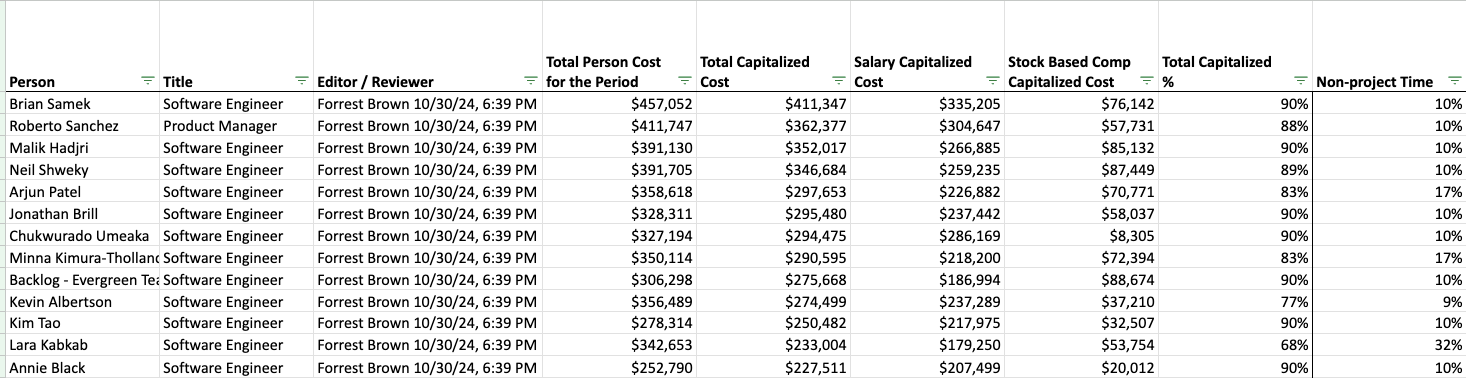
As you move to the right in this sheet, the Capitalized % is broken down into individual projects.
Each person’s time must add up to 100% between Non-Project Time, Capitalized Projects, and Expensed Projects. This control ensures over or under-counting capitalized time.
The % of time per project is calculated by Neo.Tax from the Ticketing Data. See the Allocation Methodology Detail section for how this works.
The Editor/Reviewer column provides an auditable control on capitalized %. This shows the timestamp review/approval or update to the project percents for that person. Companies often have their Engineers or Engineering Managers review and refine the initial results with their knowledge and context. When they do so, that is reflected here.

Ticket by Project by Person Sheet
The Tickets sheet shows each task/ticket the person worked on in the period. Each Ticket is associated with a Project. Neo.Tax validations check that all relevant tickets in the period are assigned to a project, which ensures that all effort is accounted for.
The percent of time per project is derived from the tickets.

The Effort per ticket value here is a raw value, based on the start and end timestamps of the ticket and the technical scope of the ticket.
Effort by Project by Person Sheet
This sheet shows the Effort by Project for each month, along with the Capitalization Status of that project in that month. This sheet is where you can validate and recalculate the Project %.
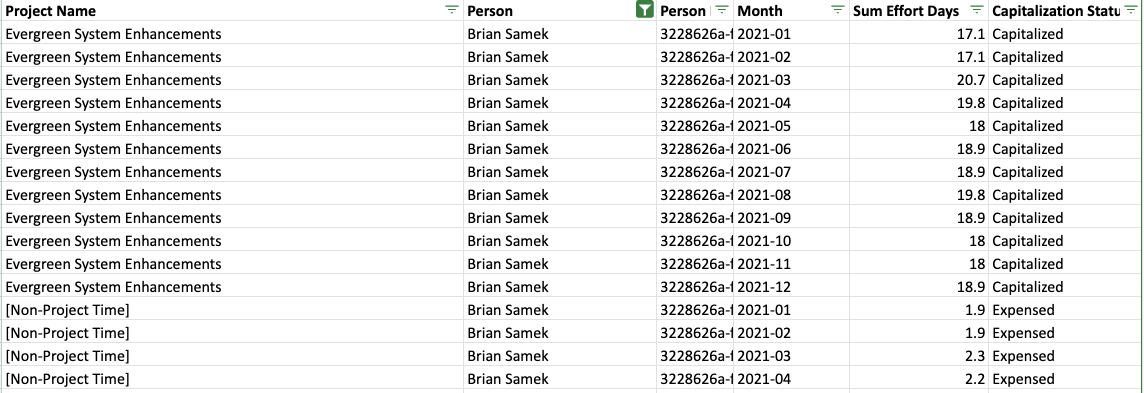
The system takes the raw values from the ticket timestamps and scope and adjusts to ensure that each person’s Effort doesn’t exceed the working days in a month, and accounts for other edge cases like tickets that are worked on sporadically or overlapping tickets.
When a person has less than a full month worth of effort, the leftover effort is attributed to Non-project time. This ensures that all time, even outside the project management system, is fully accounted for.
How to Recalculate the % by Project
Create a pivot table with these settings:
-
Columns:
- Capitalization Status
- Project Name
-
Rows:
- Person
-
Values
-
Sum of Effort Days
- Set this as % of Row Total.
-
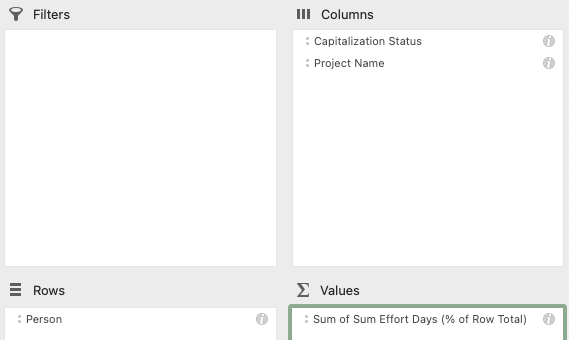
The Project %s will now match the Project by Person Phase sheet, with 1-3% variance due to rounding.
Capitalization + Milestones Detail
Our system automatically analyzes projects and provides intelligent recommendations for capitalization decisions and milestones based on ASC 350-40 guidance. This happens automatically during the sync process.
The company configures using the automated recommendation or a custom field during set up.
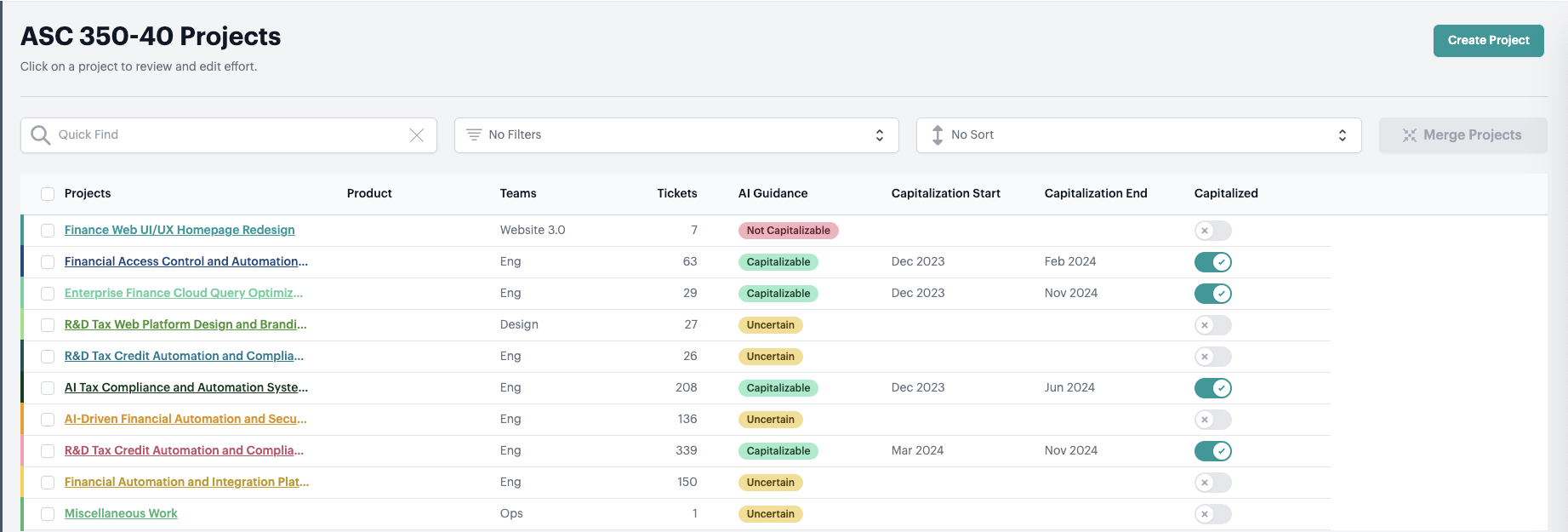
How It Works
-
Recommended Capitalization Status
Evaluates each project for capitalizibility against the guidance for ASC 350-40 and displays the reasoning.
-
Recommended Capitalization Milestones - if detected.
Capitalization Start and End Date will be automatically set for capitalized projects when they’re detected.
The company then reviews, refines, and approves the results.
Capitalization Status > How this works:
The system evaluates each project against ASC 350-40 guidelines using the summary of the work from the tickets.
Projects are identified as
- Capitalizable = Likely meets the ASC 350-40 guidelines
- Uncertain = Mix of capitalizable and non-capitalizable elements or needs more info
- Not capitalizable = Likely does not meet the ASC 350-40 guidelines.
This evaluation is done by an expert AI model trained on tens of thousands of projects rated by senior accountants.
The system outputs guidance and detailed reasoning for the company to consider. The company then decides whether to accept or change the capitalization status.
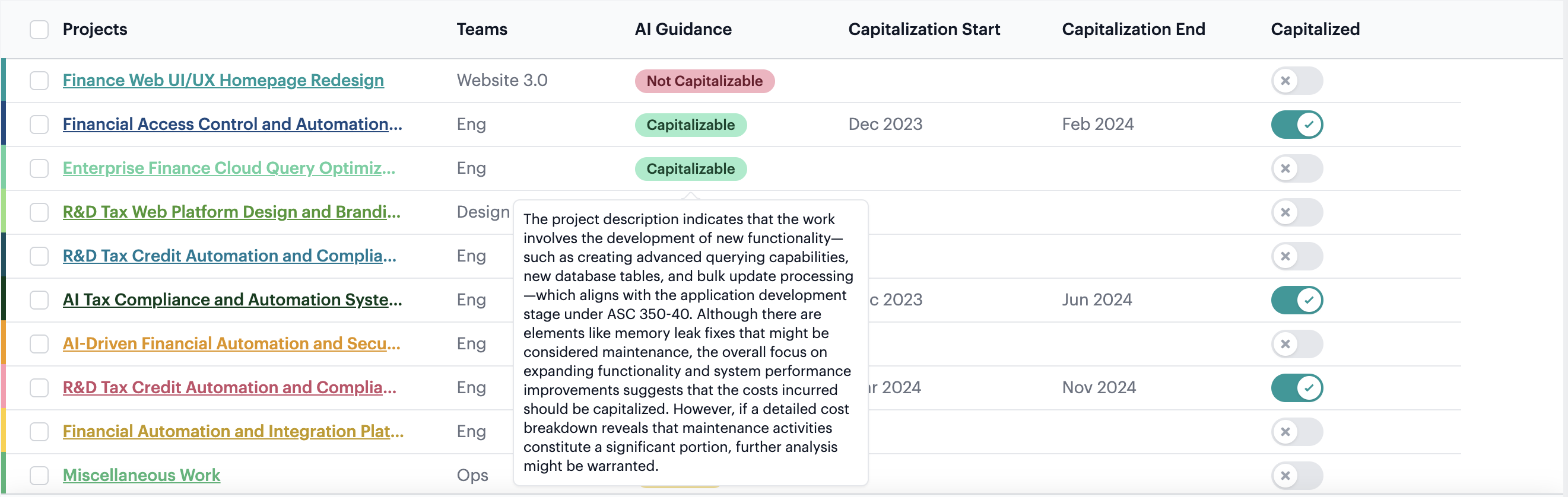
Examples:
| Project Name | Project Description | Capitalizable Guidance | Capitalizable Reasoning |
| Compass Performance and Usability Enhancement | The project aims to improve the performance and usability of Compass, a MongoDB database tool. The tasks involve addressing issues related to connection, data export, and query execution. The project also includes the addition of new features like tabs and telemetry. | Capitalizable | The project description indicates enhancements to an existing product (Compass) that include adding new features (tabs and telemetry) and improving performance and usability. Under ASC 350-40, expenditures related to enhancements that add significant new functionality to internal-use software can be capitalized. In this case, while some tasks might resemble routine maintenance, the addition of new features and enhancements to performance are indicative of costs incurred in the application development stage. |
| Go Driver Enhancement and Bug Fixes | The project involves enhancing the Go driver for MongoDB, a non-relational document database. The tasks include fixing bugs, improving testing infrastructure, updating server selection tests, and addressing security vulnerabilities. The project also involves updating the driver to support new features and specifications, such as the KMIP KMS provider and the API version declaration. | Uncertain | The project description for “Go Driver Enhancement and Bug Fixes” includes a mix of activities. Several tasks, such as bug fixes, addressing security vulnerabilities, and performance/stability improvements, are generally considered maintenance and would typically be expensed under ASC 350-40. However, the update to support new functionalities (such as the KMIP KMS provider and API version declaration) might represent enhancements that add new functionality and therefore could be capitalized if they meet the application development stage criteria. |
| Documentation Enhancement | The project aims to improve the existing documentation of the database software. This includes adding new information about connection exemptions, updating the list of supported key management services, clarifying the process of enabling auditing, and providing external documentation for Atlas API calls from Realm… | Not Capitalizable | The project involves enhancing documentation rather than developing new software functionality or creating new modules. Under ASC 350-40, costs associated with updating or maintaining documentation are considered part of ongoing maintenance expenses and do not qualify for capitalization. Therefore, the project’s expenditures should be expensed rather than capitalized. |
Capitalization Milestones > How this works:
Determining the start and end of the development phase of capitalized projects in a consistent way is one of the more challenging parts of the process for accounting teams, especially at scale.
Neo.Tax has developed a standard approach to recommend milestones automatically by looking for key indicators of the milestones in the ticketing data. This results in more accurate, consistent results at scale across an organization, reducing the risk of material error from inconsistent practices and reliance on human estimates.
Capitalization start:
Key signals: Minimum threshold of development-focused tickets.
In most cases this will closely align with the project start in the ticketing system, since the preliminary phase work around feasibility and requirement creation typically takes place outside of JIRA systems.
The capitalization start will then be set to the month where this minimum threshold is detected.
Capitalization end:
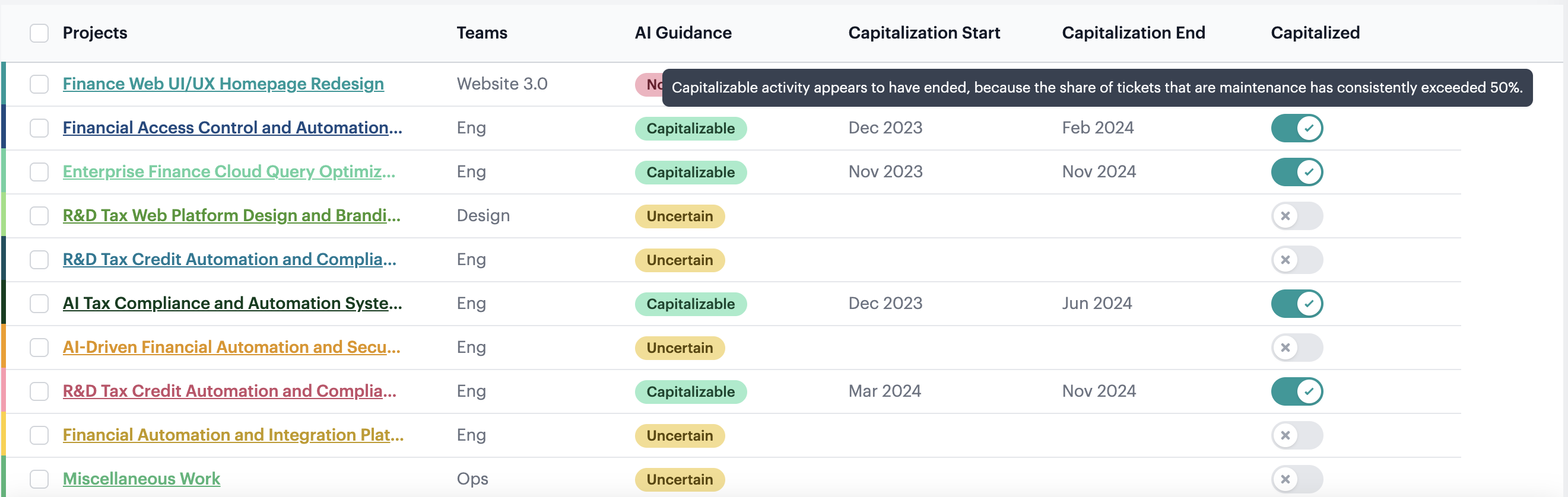
Key signals: Keywords in the tickets that signal release to production and general availability. The share of bug and maintenance tickets also factors into to the determination as those show evidence of general availability.
Capitalization end will then be set to the month where the release signals cross the threshold.
When no release signals are detected and the project remains active, the capitalization end date will remain blank.
Example:

The highlighted ticket would be identified as a release milestone and the capitalization end for the project would be set to July 2024.
If a capitalized project ends without a release milestone, the capitalization end date will be set based on the end of the project.
Allocation Methodology Detail
Neo.Tax calculates the percent of time each person spent on each project and on nonproject time. This is done by month and then aggregated for the quarter/year.
- Calculate the effort for each task/ticket in each month.
This is done using a multi-factor model that looks at:
- Change logs - when it was started, in progress, in review, completed
- Weighted by the content of the task (eg: minor bug fix vs a large architecture design)
- Sums up the effort by person for the month
- Normalize the data so that the total effort for each person matches the business days in the month
This involves accounting for a wide range of data quality issues like:
- Differences between people/teams in volume of tickets/effort in a period
- Bulk actions/mass updates
- Tasks that are stuck and left in progress, but no actual work is happening
-
Allocate remainder of effort to Nonproject time
- People with no effort in the month will have 100% nonproject time.
-
Calculate the percent of time spent on each project and nonproject time in the month
- Sum up the effort for each task in the project
- Divide by business days in the period
-
For a larger period like quarter/year, then average the project percents by month.
- This approach ensures that the allocation by month does not change as the year goes on, so prior periods remain accurate and always add up to the total at the end of the year.
- The result will almost always match recalculating the percents by summing effort for the entire period, while avoiding the above issue.
Detailed Example:
Dmitry’s Tickets in March
| Ticket ID | Project Name | Effort (Days) | Assignee |
| RUBY-2371 | Ruby Driver Enhancement | 1.2 | Dmitry Rae |
| RUBY-2296 | Ruby Driver Enhancement | 1.3 | Dmitry Rae |
| RUBY-1700 | Ruby Driver Enhancement | 1.5 | Dmitry Rae |
| RUBY-2575 | Ruby Driver Enhancement | 1.8 | Dmitry Rae |
| MONGOID-4668 | Improving Mongoid Compatibility and Functionality | 6.1 | Dmitry Rae |
| MONGOID-4669 | Improving Mongoid Compatibility and Functionality | 7.21 | Dmitry Rae |
⇒ Dmitry’s Allocation by Project for March
| Effort (Days) | % of Time | |
| Ruby Driver Enhancement | 5.8 | 26% |
| Improving Mongoid Compatibility and Functionality | 13.31 | 61% |
| Non-project Time | 2.89 | 13% |
| Total | 22 | 100% |
⇒ Dmitry’s Allocation for Q1
| Project | Jan | Feb | March | Q1 Total |
| Ruby Driver Enhancement | 0% | 47% | 26% | 24% |
| Improving Mongoid Compatibility and Functionality | 85% | 24% | 61% | 57% |
| Nonproject | 15% | 29% | 13% | 19% |
What about non-project time?
The system calculates time spent not working on projects. It does this by calculating the gap between a full month of effort and actual effort.
Activity ⇒ Effort
For each ticket, we extract a start date and completion date (once completed) directly from the source system, providing a transparent, date-stamped audit trail. This duration provides the anchor for the ticket.
We then calculate the number of “Effort Days” for each project based on the number of days that there was an active ticket for that project and the ticket scope.
- If all the tickets for a given working day are related to a single project, then that project gets 1 day of effort.
- If on a single day, there are multiple tickets related to different projects, then the day’s effort is allocated proportionately to the number of tickets open on that day and their scope.
- This is based on the timestamps of the tickets from the underlying project system rather than assuming equal weight per ticket.
We then use a Machine Learning model to account for edge cases in the underlying data like when a large ticket is worked on intermittently or multiple smaller tickets are handled on the same day.
A ticket’s effort grows with the calendar time and technical scope it occupies, so longer, more complex work streams naturally outweigh quick fixes. This mirrors the reality of engineering effort while remaining fully traceable to source‑system timestamps.
The following chart shows the number of tickets that were actively worked on by week. This number is calculated first using the raw timestamps in the source system and then adjusted by the Machine Learning model.
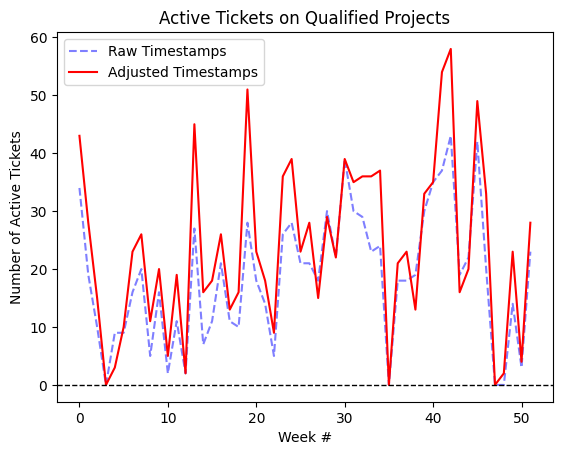
With the complete set of tickets and their active period, we then sum up the Effort totals. We allocate Jason’s time per project proportional to the sum of effort in each project. For ease of analysis, we round the percentages in a way that minimizes the total rounding deviation and ensures effort adds up to 100%.
FAQ/Controls:
What about time outside JIRA/ticketing?
The system calculates time spent not working on projects. It does this by calculating the gap between a full month of effort and actual effort.
What controls are there?
Neo.Tax has extensive controls in place at user and system level to ensure the input data is accurate and complete, and all updates that impact capitalization status and time are tracked and auditable.
User controls: The company controls who has access to view and edit projects, capitalization status, and %s and all user actions are logged at the user level.
Changes and review of Employee time is reflected in the Editor/Source column
Input controls:
At sync time, Neo.Tax runs validations to confirm all tickets in the company’s project management system are accounted for. The validations check all Tickets that have an Assignee and were active or completed in the period are assigned to a project.
Prior periods are never updated on sync and the Effort values, Assignee, and Project assignments are locked for each month.
How does Neo.Tax handle capitalization milestones?
Neo.Tax AI recommends capitalizable projects and milestones by analyzing the project details and tickets. More details on how here.
Companies using Neo.Tax control what projects to capitalize and the milestones-either using the guidance or their own policies and judgments.