
Close process and timeline
Plan your monthly ASC close by working backward from the date you want to book your capitalization entry. Your sync pulls in and processes engineering activity for the period.
Short version: Schedule your sync 3 business days before your target close date. If your engineering team reviews project allocations, allow 4–5 business days. Your sync runs automatically on the schedule configured during onboarding.
1. Choose your close date and review schedule
Your target close date is the day you plan to book the capitalization entry.
Decide whether your engineering leads will check and adjust project allocations before you close. If they will, reserve 1–2 business days for their review.
Count backward from your target close date using the schedule below. Count only business days, excluding weekends and holidays.
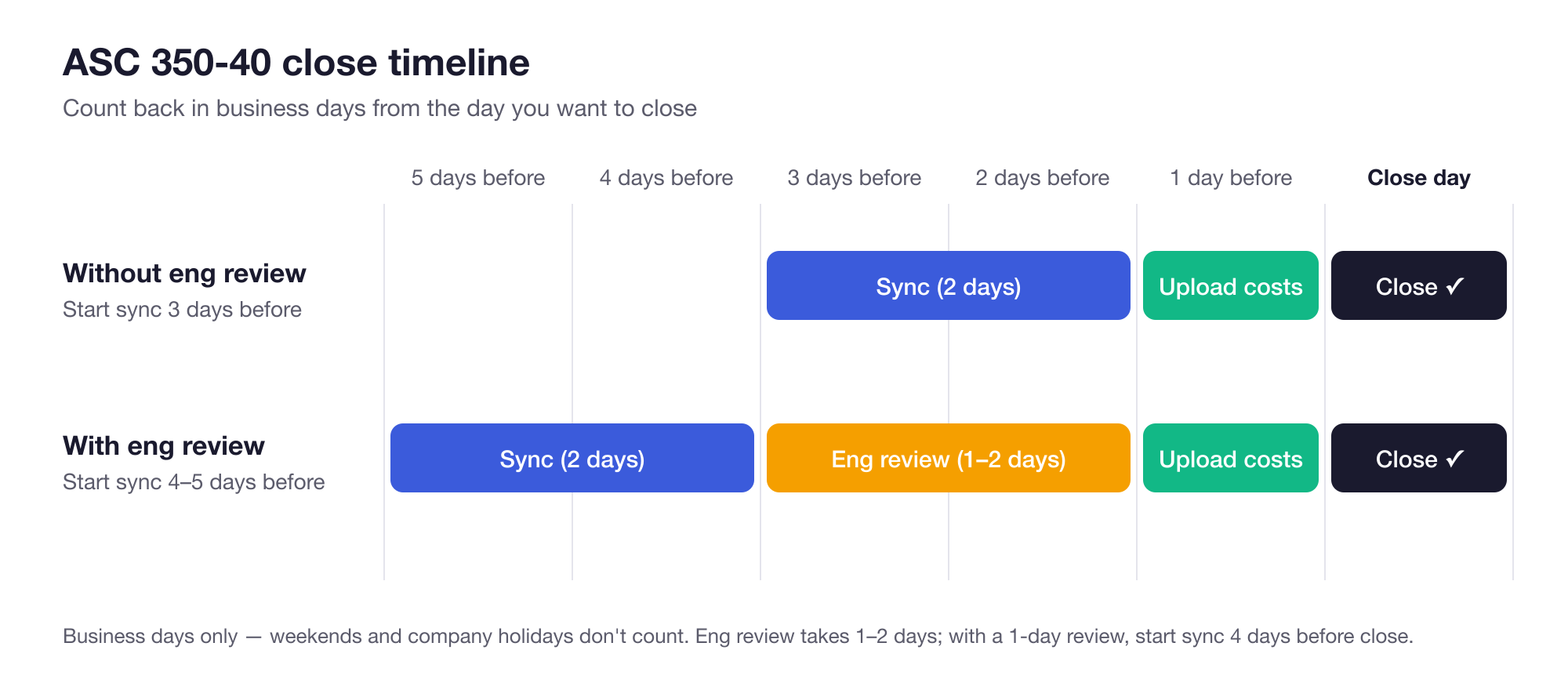
| If your team… | Schedule the sync to start… |
|---|---|
| Skips engineering review | 3 business days before close |
| Needs a 1-day engineering review | 4 business days before close |
| Needs a 2-day engineering review | 5 business days before close |
These planning timelines allow 2 business days for the sync, 1–2 business days for engineering review if needed, and 1 business day for your team to retrieve and upload costs and make final changes before the close date. Add extra time if your team needs more buffer.
2. Set your sync date
You choose and configure your recurring sync date during onboarding with the Neo.Tax team. The sync then starts automatically; you do not need to start it manually each month.
Closing early in the month? If your sync date is before month-end, effort that occurs after the sync starts is automatically carried over to the next month. No action is needed from your team.
Example: If your October sync starts on October 28, activity before the sync starts is included in your October close. Activity after the sync starts carries over automatically to November. No action is needed from your team.
If you want to change this later, contact your Neo.Tax customer success manager to adjust your sync date.
3. Follow the close steps
| Step | Who does it and what happens | Time to allow |
|---|---|---|
| Sync | Neo.Tax automatically pulls in and processes your engineering activity for the period. | 2 business days of processing |
| Engineering review (optional) | Engineering leads check and adjust projects & allocations. | 1–2 business days for your team |
| Upload costs and make final changes | Accounting retrieves and uploads employee costs for the period and makes any final changes (haircuts, senior employee adjustments, etc). | Reserve 1 business day for your team to export, upload, and review. Actual matching after upload takes less than 30 minutes. |
| Lock the period and close | Accounting locks the period when ready to book, preventing further edits, then books the capitalization entry. | Your target close date |
Engineering Review (Optional)
- Review Projects for capitalization and capitalization milestones
- Review Engineer Allocations and Adjust if needed
As part of implementation, your Neo.Tax customer success manager will train your team on how to do this.
Cost File Upload
If you use fixed costs/blended rates and have already configured amounts per person, you can skip the cost-file export and upload steps below.
- Export and prepare your cost file whenever it is ready.
- Upload the cost file on the ASC 350-40 wages page after the sync completes. The schedules below reserve a day after engineering review for uploading costs and making final changes.

Example: Target close is first business day of the month
First Business Day = Monday, November 2, 2026
Without engineering review: schedule the sync for month end - 3 = Wednesday, October 28.
- Wed Oct 28 – Thu Oct 29: Sync
- Fri Oct 30: Upload costs and make final changes
- Mon Nov 2: Lock the period and book the entry
With a 2-day engineering review: schedule the sync for month end - 5 = Monday, October 26.
- Mon Oct 26 – Tue Oct 27: Sync
- Wed Oct 28 – Thu Oct 29: Engineering review
- Fri Oct 30: Upload costs and make final changes
- Mon Nov 2: Lock the period and book the entry
With a 1-day engineering review, schedule the sync for Tuesday, October 27.
In this example, your October capitalization number is complete for the close. Effort that occurs after the sync starts carries over to November automatically; you do not need to take any action.
Example: Target close is 5th business day of of the month
Fifth business day = November 6, 2026
Without engineering review: schedule the sync for month end, Monday November 2.
- Tue Nov 3 – Wed Nov 4: Sync
- Thu Nov 5: Upload costs and make final changes
- Fri Nov 6: Lock the period and book the entry
With a 2-day engineering review: schedule the sync for month end - 2, Friday, October 30.
- Fri Oct 30 and Mon Nov 2: Sync (the weekend does not count)
- Tue Nov 3 – Wed Nov 4: Engineering review
- Thu Nov 5: Upload costs and make final changes
- Fri Nov 6: Lock the period and book the entry
With a 1-day engineering review, schedule the sync for Monday, November 2.
Need help?
Contact your Neo.Tax customer success manager to set up your close schedule.