
Automated capitalization and milestones
Our system now automatically analyzes projects and provides intelligent recommendations for capitalization decisions and milestone dates. This happens automatically during the ASC 350-40 sync process to streamline the close process.
Benefits
- One Less Step: New projects get capitalized automatically based on the work done
- Consistency: Standardized approach to capitalization decisions across your organization
- Flexibility: Full control to override any automated decisions
- Continuous Improvement: Updated recommendations as project details evolve
How It Works
-
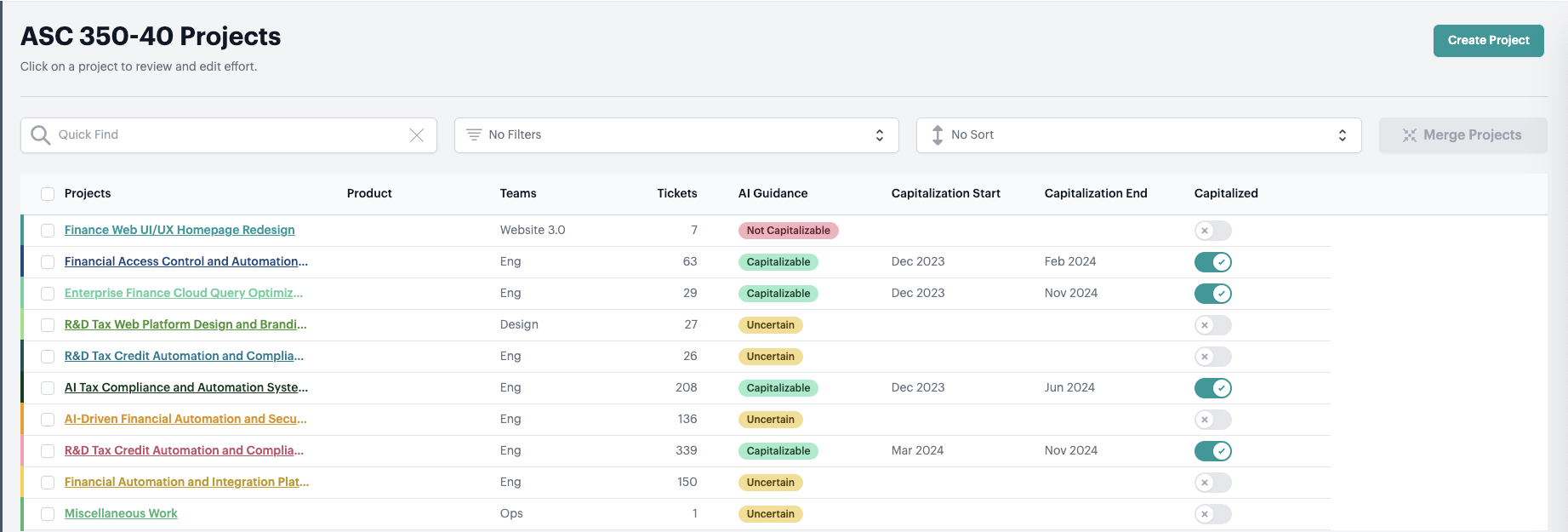
Recommends Capitalization Status
Evaluates each project for capitalizibility against the guidance for ASC 350-40 and displays the reasoning.
-
Sets Capitalization Milestones - if detected.
Capitalization Start and End Date will be automatically set for capitalized projects when they’re detected.
You can then inspect, review, and adjust to refine the results. The system then learns from your changes.
Detailed Behavior
For New Projects
When the system identifies a new project, the system will automatically set the capitalization status:
Capitalization Status
- If our system predicts your project is Capitalizable, we’ll automatically set the status to “Capitalized”
- If predicted as Not Capitalizable or Uncertain, no automatic status is set.
You can review and set those manually.
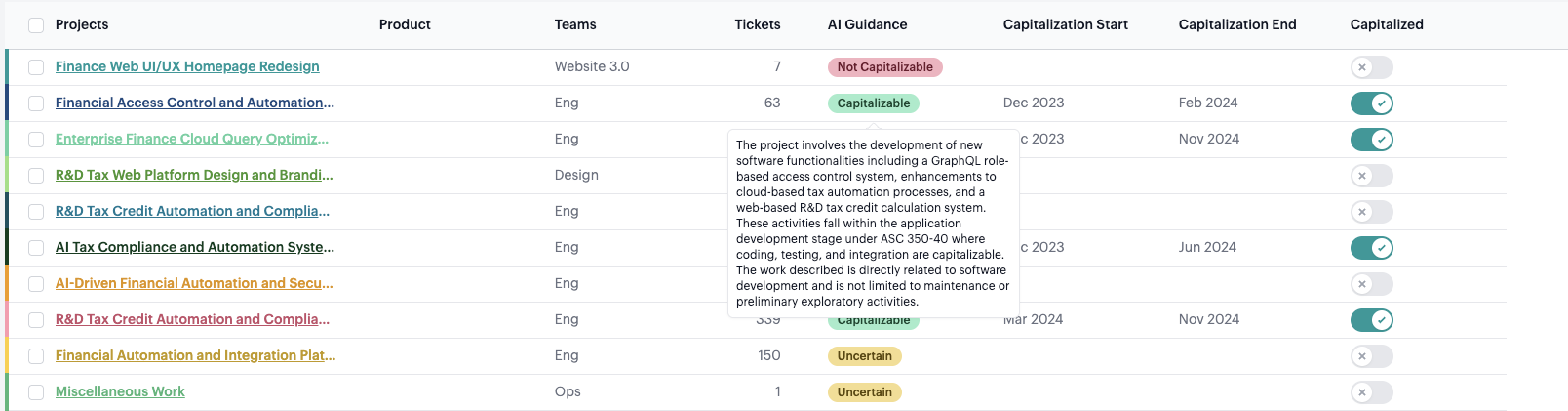
Examine the reasoning for the capitalization guidance by hovering over the AI Guidance.
Capitalization Milestones (when status = “Capitalized”)
- Start Date: Automatically set to the recommended start date
- End Date: Automatically set to the recommended end date (or left blank if no prediction available)

Expensed Projects
- No milestones are set for projects marked as “Expensed”
For Existing Projects
We respect any user overrides to capitalization status and milestones, while providing helpful updates:

Overrides Are Respected
- Capitalization status: Never changed after initial sync
- Start date: Never changed after initial sync
- End date: Only set if it was previously blank and the system now identifies it has ended.
Frequently Asked Questions
Q: What if I disagree with the AI’s recommendation?
A: You have full control to override any automated decisions. The system learns from your changes to improve future recommendations.
Q: Will this change my existing project settings?
A: When an existing project is capitalized and has no capitalization end date, the system will set a capitalization end date when it is detected based on the share of maintenance tickets.
All other values are never updated for existing projects. Once you set capitalization status, start date, and end date the system never changes those values.
Q: How does the system determine capitalizability?
A: Our AI evaluates projects against ASC 350-40 guidance, considering factors like development stage, project type, and historical patterns. You can view the reasoning by hovering over the AI Guidance tooltip.
Q: How does the system determine capitalization start and end dates?
A: Our AI evaluates the projects against ASC 350-40 guidance by analyzing the type of tickets worked on in each month. The start date is set when the tickets indicate active development work has begun.
The end date is set when the share of maintenance/operational tickets in a project exceeds 50% consistently, or when the project ends. You can view the reasoning by hovering over the capitalization end date. More details here.