
Set capitalized percentages for senior employees
The Set Capitalized % feature allows you to quickly assign Capitalization percentages to multiple people at once and automatically distribute them across your capitalized projects without having to allocate project by project.
Summary
The Set Capitalized % feature allows you to quickly assign Capitalization percentages to multiple people at once and automatically distribute them across your capitalized projects without having to allocate project by project.
Use this for: Allocating Capitalization for employees when there is not clear way to allocate by project. The main use case is to allocate executives or other senior employees who don’t have any project management data.
The system will apply the Capitalized % proportionally to the largest capitalized projects in the month based on those projects share of current employee capitalized allocation, saving you from having to do manual project-by-project allocation.
Today this is available for the monthly view only, but will be expanded to quarterly/semi-annual views in the future.
How it Works
How It Works in Detail
Accessing the Feature
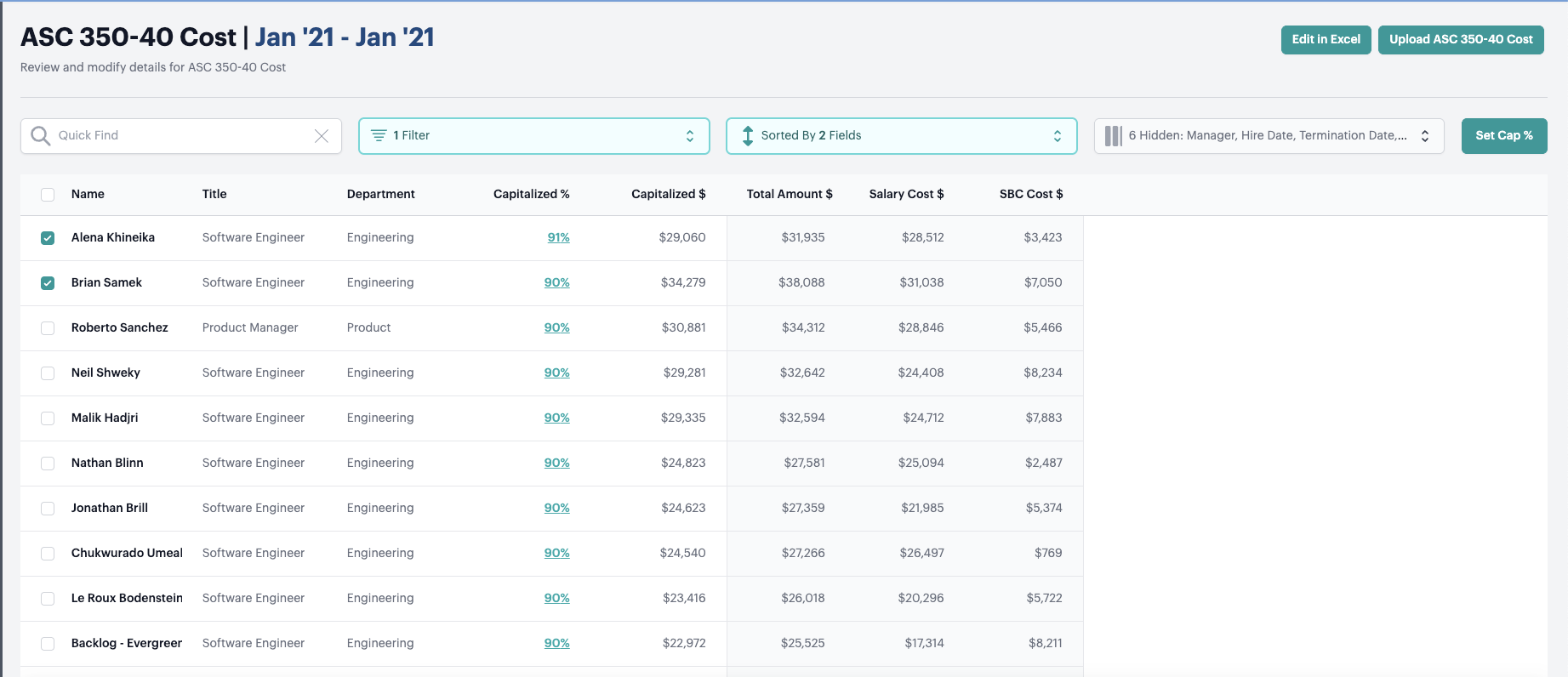
- Navigate to either the ASC 350-40 Cost page
- Select one or more expenses by checking the boxes next to them
- Click the Set Cap % button that appears above the table
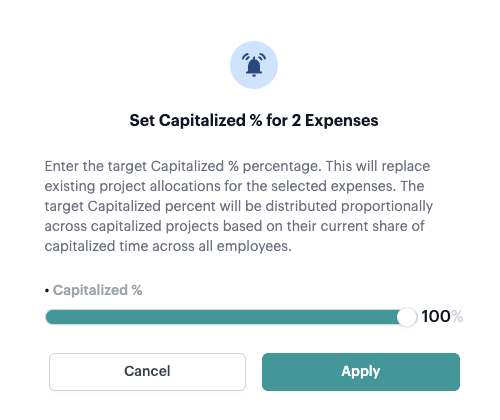
- The “Set Cap % for [X] Expense(s)” modal will open
Setting Your Capitalized Percentage
In the modal, you can set your desired Capitalized percentage (0-100%) either by:
- Using the slider for quick adjustments
Automatic Project Distribution
When you apply the Capitalized percentage, Neo.Tax automatically distributes it across your capitalized projects using this calculation:
Project Allocation = Target Capitalized % × Project Weight
Where Project Weight = (Project’s Allocation across all employees ÷ Total Capitalized Allocation across all employees)
Example: If you set 80% Capitalized and Project A represents 43% of total employee capitalized allocation in the period, Project A will receive 34% allocation (80% × 43% = 34%)
What Gets Replaced
This overrides and replaces any existing project allocations for the selected expenses. Your previous manual allocations will be overwritten with the new proportional distribution.
FAQ
Q: What happens if I don’t have any capitalized projects or allocations in the period?
A: You’ll see an error message explaining that capitalized projects with allocations must exist before using this feature.
Q: How precise are the project allocation percentages?
A: The system calculates precise percentages to the nearest whole number for display.
Q: Will this work with a large number of projects?
A: Yes, the feature is designed to handle companies with any number of capitalized projects efficiently. All capitalized projects will receive proportional allocations based on their employee expense weights.