
Connect Workday for payroll data
You can connect Workday via API to pull in salary information for the R&D credit.
- Follow the instructions here to set up your Workday Integration Systems User with the correct permissions.
https://support.tryfinch.com/hc/en-us/articles/26242318065684-Workday-Add-an-Integration-System-User
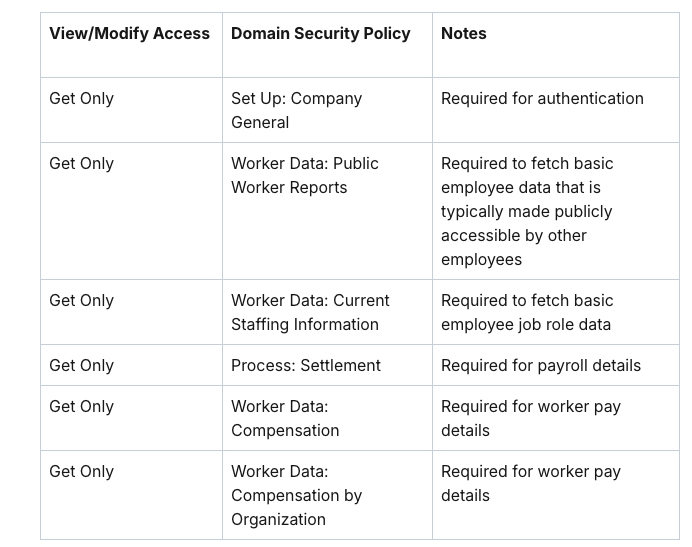
Confirm you have all of these set up:
-
Required Domain Security Policies for Pay Data (all)
-
Domain Security Policies >
- Person Data: Work Contact Information
Once the account is set up in Workday, go to NeoTax > Connect Payroll Provider > Select Workday.
Then enter the Integration Systems User info created in the previous step.
FAQ
What is Finch?
Neo Tax uses Finch to connect your payroll and HR systems.
Your information is handled securely with end-to-end encryption. Your credentials are not shared with Neo Tax. You can review a list of permissions before granting Neo Tax access to your system.
Finch is a SOC2-Type2 Certified integration aggregator that enables you to securely connect your Payroll/HR Systems to NeoTax.