
The most common question we get from customers is pretty unsurprising: “So how does the AI work?”
But the second most common question we get has nothing to do with AI, but it has everything to do with taxes: “Do you guys track all the changes that I make? Can I audit those changes?”
To be a company in a compliance-heavy industry like tax means you must be obsessive about data. Not just the data, but the data’s history, too. That’s why we built an Audit Log into our data storage systems; it ensures that we can always track the full lineage of all data we ingest and produce.
Neo.Tax’s Audit Log tracks exactly when a change has been made to a data set, and stores the data before that date, in case it was made in error. Because project management data is touched by everyone from engineers to managers to tax teams, this is an invaluable tool for Neo.Tax customers.
Having an Audit Log gives Neo.Tax powerful capabilities: we can answer questions like “what did this customer’s tax calculation look like on March 15th?” or “who changed this expense allocation and when?” But these aren’t just nice-to-haves—they’re essential for regulatory compliance, customer support, improving the product, trend analysis, and debugging production issues.
But how does this actually work under the hood? Let’s explore how we implement these change logs using PostgreSQL triggers and changelog tables.
Without Audit Logs, You Only Have As-Is Data
The best way to understand what an Audit Log actually does is to look at a real example. So, let’s suppose we have two tables: one that tracks engineering projects, and a second that tracks how an engineer’s time is allocated.
projects table:

project_allocations table:
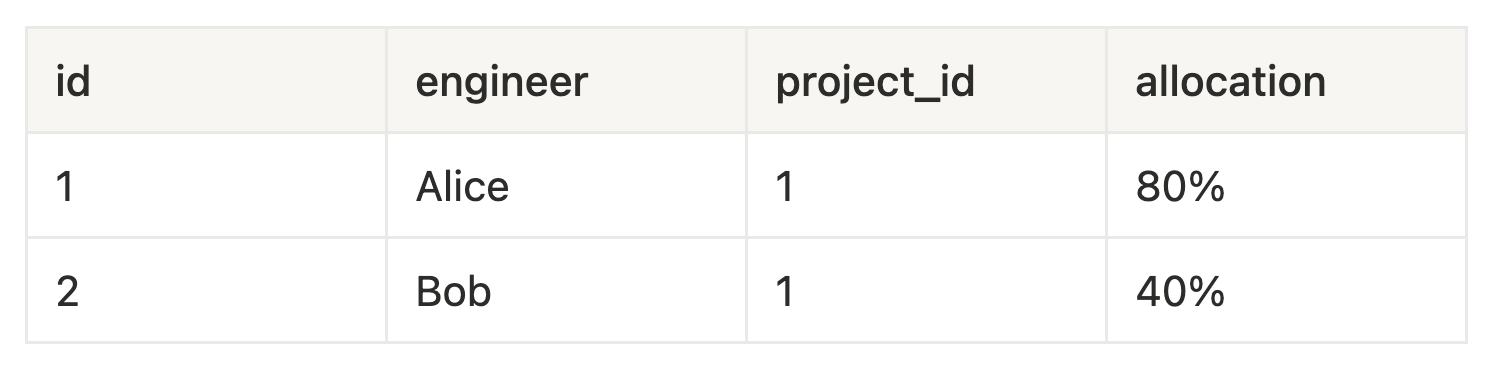
These two tables tell us that Alice and Bob are working on the AI Tax Assistant v2 project. But what they don’t tell us is:
- Were there other projects before?
- Did these allocations change?
- Who made these decisions and why?
With Audit Logs, Data Tells a Story
Though the following Audit Log data may be hard to parse, someone with knowledge of what the project management data is referring to can now understand the full narrative:
- Two separate projects were created by Neo.Tax’s AI analysis pipeline on January 15th.
- Mary merged the two projects on February 3rd to leave just one project: AI Tax Assistant v2
- Peter reviewed the allocations on March 10th and updated Alice’s allocation
January 15th - Project Creation
projects_change_log table: (inserted two projects)

project_allocations_change_log table: (inserted allocations for projects)

February 3rd - Merge Projects
projects_change_log table: (deleted project ML Document Classifier)

project_allocations_change_log table: (updated project_id for Bob)

March 10th - Manual Adjustment projects_change_log table: (unchanged)
projects_change_log table: (unchanged)

project_allocations_change_log table: (updated project id for Bob)

To have that level of historical data is invaluable in an AI-powered system like Neo.Tax. But it’s just as important to have the ability to understand every change at a human level. To achieve the highest level of compliance, you need to create a system that can easily audit every change. Everything can be explained. Every question can be answered.
An audit log is also incredibly valuable to developers because it provides a mechanism to debug and identify root-cause issues effectively. For Heads of Tax, the ability to see the lineage of the data is just as important. There’s an expectation that every aspect of tax can be understood and checked by every stakeholder; this allows any filer to understand if/when a data input was changed, who changed it, and why. In an era when contemporaneous data is becoming table stakes for R&D tax credits, this granular row-by-row view is table stakes as well.
Now for the nitty gritty of how we built our Audit Log….
Technical Implementation Details
When implementing Audit Logs, here are key considerations to ensure performance and correctness:
- Keep Column Order Identical for Generic Triggers
Maintain the exact same column order between your Main Table and Audit Log table. This allows you to write generic trigger functions that use SELECT *
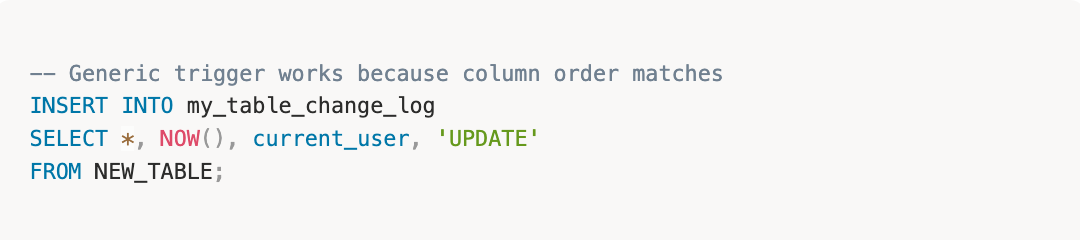
This significantly reduces boilerplate code and makes triggers easier to maintain across hundreds of tables.
- Use Statement-Level Triggers for Bulk Operations
PostgreSQL has two trigger types: row-level (fires once per row) and statement-level (fires once per statement). For Audit Logs, use statement-level triggers:
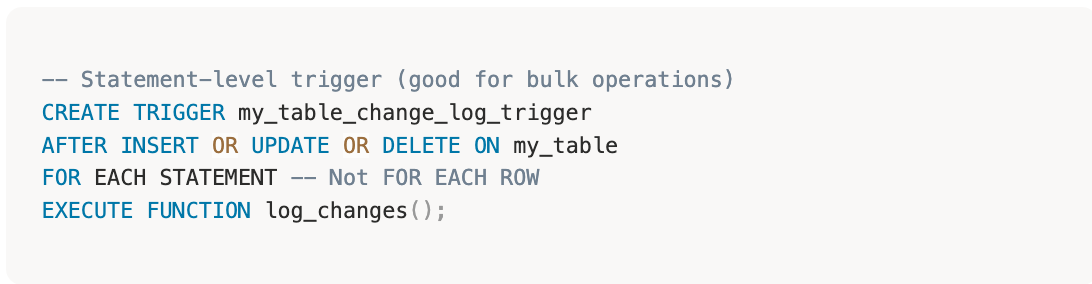
This dramatically improves performance for bulk operations. (Imagine logging 10,000 row updates with one trigger execution vs. 10,000!)
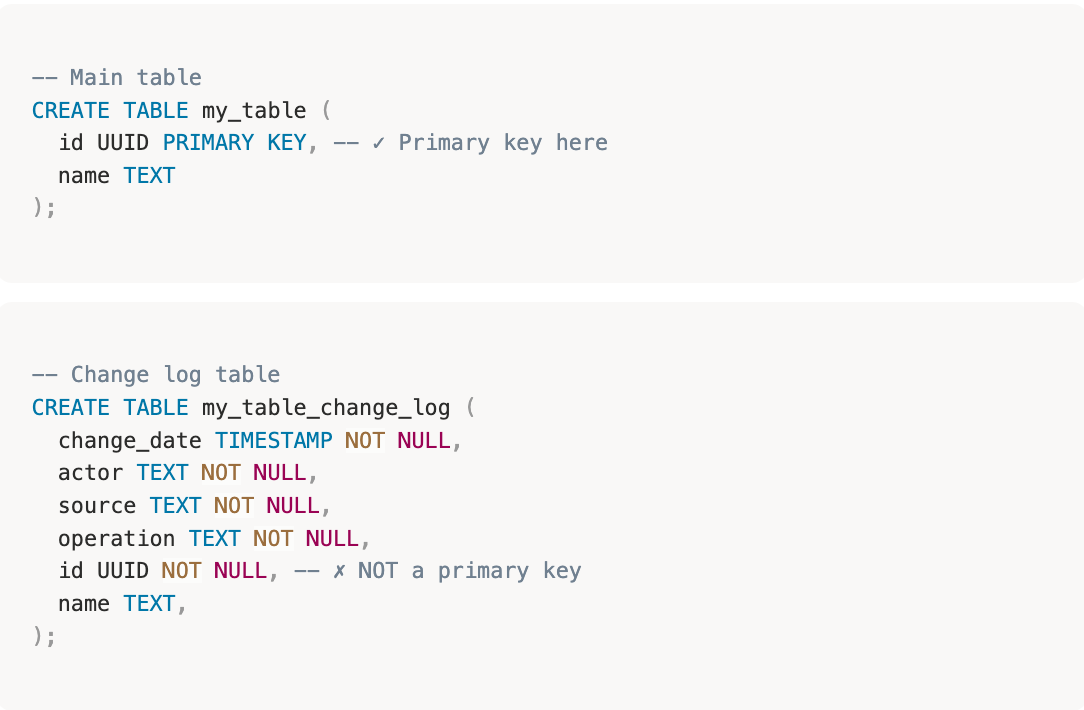
- No Primary Key on ID Column
Unlike your Main Table, the Audit Log table will have multiple entries for the same id (tracking changes over time). Therefore:
- Surrogate Primary Key for Delta-Based Replication
If you’re replicating change logs to a data warehouse using delta detection (e.g., Fivetran, Airbyte), these tools require a primary key so add a surrogate primary key.
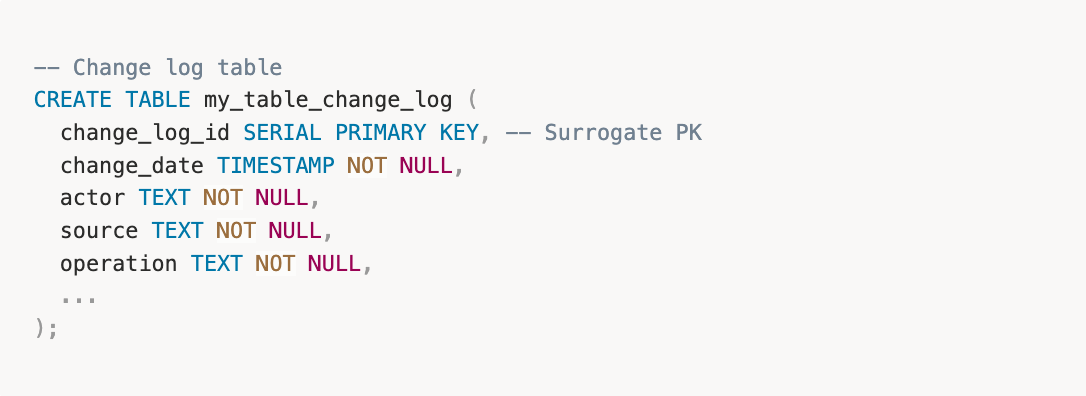
This allows replication tools to identify new changes efficiently.
- Drop All Foreign Key Constraints
Audit Log tables must not have foreign key constraints. If they did, deleting a referenced row in the main table would fail on a ON DELETE CASCADE operation in your audit trail.
Audit Log tables are append-only archives—they should never block operations on live data. 2. Convert Enum Types to Text
Enum types in PostgreSQL are essentially foreign keys to an internal lookup table. If you modify or drop an enum value, it would break your Audit Log. Therefore, you should convert enums to text:
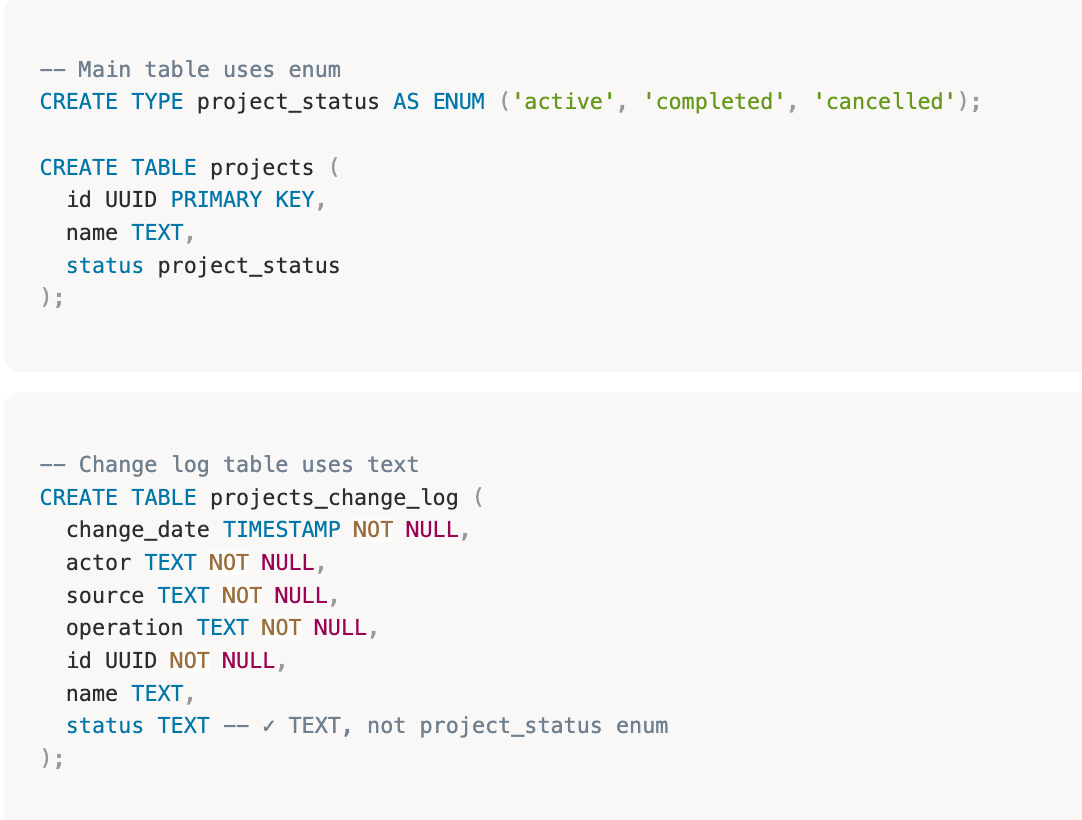
This ensures that the data in the audit log remains readable even if enum values are renamed or removed.
- Minimal Indexing for Performance
Audit Logs are write-heavy and read-infrequent. Every index slows down inserts:
** Only add an index for proven query patterns **
The goal: near-zero performance impact on your application’s write operations.
Why Share This?
As we said in our earlier post about how our AI understands ticketing data, we believe that any AI-powered company needs to show their work. Trust is everything in tax, and we understand that trust is earned, not assumed.
We’re confident in what we’ve built, so it’s always fun to pull back the curtain for our customers. But if you’re confused by any of what’s in here, get in touch and let our team of data scientists and tax experts walk you through it!